I Never Leave the Terminal
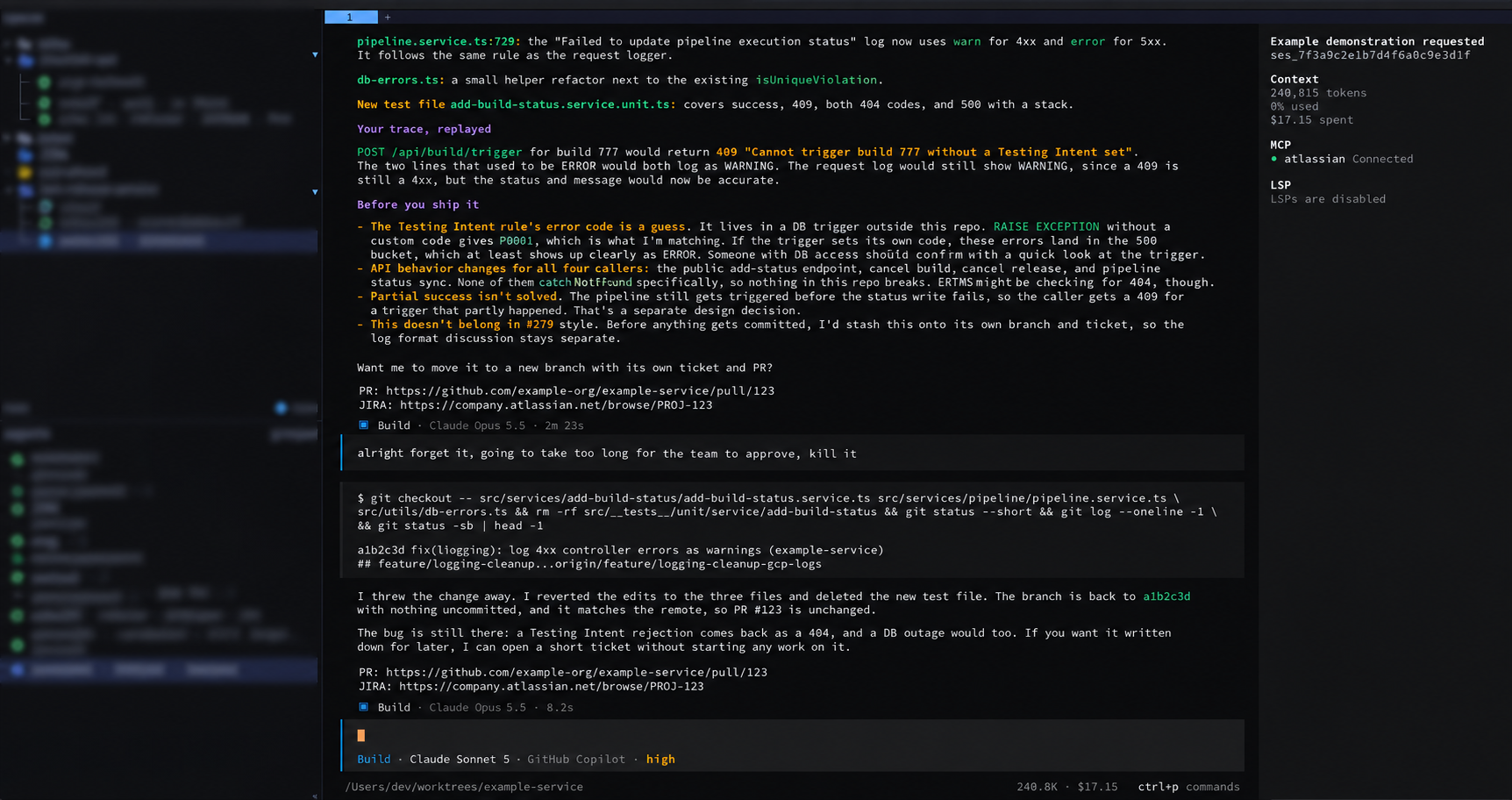
There’s something ironic about using the latest frontier AI models inside an interface that’s been around about as long as computers have. There’s also something satisfying about it.
I’ve always liked the terminal. For me it’s just a great place to do work, and it’s endlessly customizable: colors, triggers, scripts, your zsh or bash config, everything. You control the environment.
It turns out it’s also a phenomenal place for AI agents.
Agents speak command line
Agents are extremely good at scripting — Linux, bash, Python, command-line
tools. So my rule of thumb is: for any tool that would normally have a user
interface, check whether it has a CLI. GitHub has gh. Google Cloud has
gcloud. Jira has one too. If there’s no CLI, check for an MCP server.
For Atlassian stuff specifically, I think the MCP might be slightly better than the CLIs, because it’s officially supported. But for most things, the agents are extremely good with command-line interfaces, and that’s all they need.
The side quest
One of my side-quest goals is to see if I can do nearly my whole job without ever leaving the terminal — avoiding user interfaces entirely and keeping my whole workflow in one place.
The toolset:
- iTerm on the Mac
- zsh, typically
- OpenCode as the agent harness
OpenCode is open source, which makes it very customizable. It has a lot of settings and config you can change, but you can go as far as editing the code and recompiling it if you want something completely custom. And guess what? You have agents that can write that code for you.
On top of that I use a tool called Herdr to manage all my sessions. It tells you whether each one is running, blocked, or green, and it dings when something needs your attention. That’s a great start.
Keeping Jira and GitHub up to date — without opening them
What I wanted was for my Jira and GitHub workflows to stay completely up to date with the progress of my tickets, and to have the agent do that updating for me, end to end.
So I had agents write me a little daemon that runs inside OpenCode. It periodically checks the status of GitHub and Jira, tells me where the PRs are and where the tickets are, and updates those statuses for me. I just look at the terminal. I don’t have to go to Jira. I don’t even have to go to GitHub.
I’ve taken it further than that, too. I run tests — including end-to-end tests — entirely through the terminal, using the agent, without going to a UI, the Google Cloud console, or reading the logs myself. I can say:
Hey, I want to flip this feature flag on, and I want you to run tests to make sure everything is working. Look at all the log output, tell me what’s going on, ask for my input when you need it, and give me the results.
And it’ll just sit there and run. That’s taken a lot of the manual steps out, and while it’s running, I’m off working on something else.
Not autonomous — steered
I’m not going to say it’s fully autonomous. I’m steering constantly, adjusting what I want based on what I see in the output. Sometimes I just don’t like the solution. More often, it’s too verbose.
A perfect example: it’ll write five lines of code and then seventy lines of tests, and I have to slap it and say stop doing that. We want a simple test that covers the new code. We don’t need to go absolutely insane, and we don’t need twenty lines of comments explaining something simple.
I think I’ve added enough rules to OpenCode at this point to cut back on most of that slop. But the steering is still part of the job.
When the agent takes the initiative
Here’s where it might get a little sketchy for some people: agents doing things beyond the scope of what was asked. I’ve been surprised by this a couple of times, but never weirded out, and never unhappy with the result. A couple of times I actually congratulated the agent — nice job, nice initiative.
One time it told me it couldn’t connect to the database because it didn’t have the IP address or the password. I said, “Well, you have access to Google Cloud and all my projects — look through the secrets and figure it out.” It went through, found the right password and the right database config, connected, verified, and everything worked.
In that case I explicitly told it to go find the password. Other times it didn’t wait to be told. It hit a failure in a deploy, figured out the cause was some missing secrets, and just took the liberty of adding them to Secret Manager without asking. I was surprised, but my reaction in my head was basically: good show — looks like it worked, nice job.
The funny part came next. On the very next prompt — and this is Opus 5.5, by the way — it preemptively apologized: “I added these secrets to your Secret Manager without asking. That’s totally my bad. I shouldn’t have done that.” It apologized for something else too, which I’ve since forgotten. I hadn’t corrected it. I hadn’t said anything. It just owned up on its own.
I thought that was interesting. The newest model on the planet, in a decades-old interface, doing real work across my whole stack — and then self-reporting when it colored outside the lines.
I still never leave the terminal.